Recreating the Aerochrome Look: My Journey into Infrared Film Emulation
I discovered surreal pink-and-cyan landscapes on Instagram tagged Aerochrome and learned they came from Kodak’s discontinued infrared film originally used for military reconnaissance. Trying to copy the effect in Lightroom alone produced unpleasant, artificial colours. Using a dedicated Aerochrome preset improved things, but still looked too digital. By taking the edited image into Dehancer and applying film grain, halation, and bloom, I achieved a more organic, film-like result. This is still only an interpretation of Aerochrome—not a true infrared process—and it works best with scenes rich in foliage. The only authentic Aerochrome look still requires IR-sensitive capture, either via modified digital cameras or using real IR film with filters.
Discovering Aerochrome – and the folly of "just a preset"
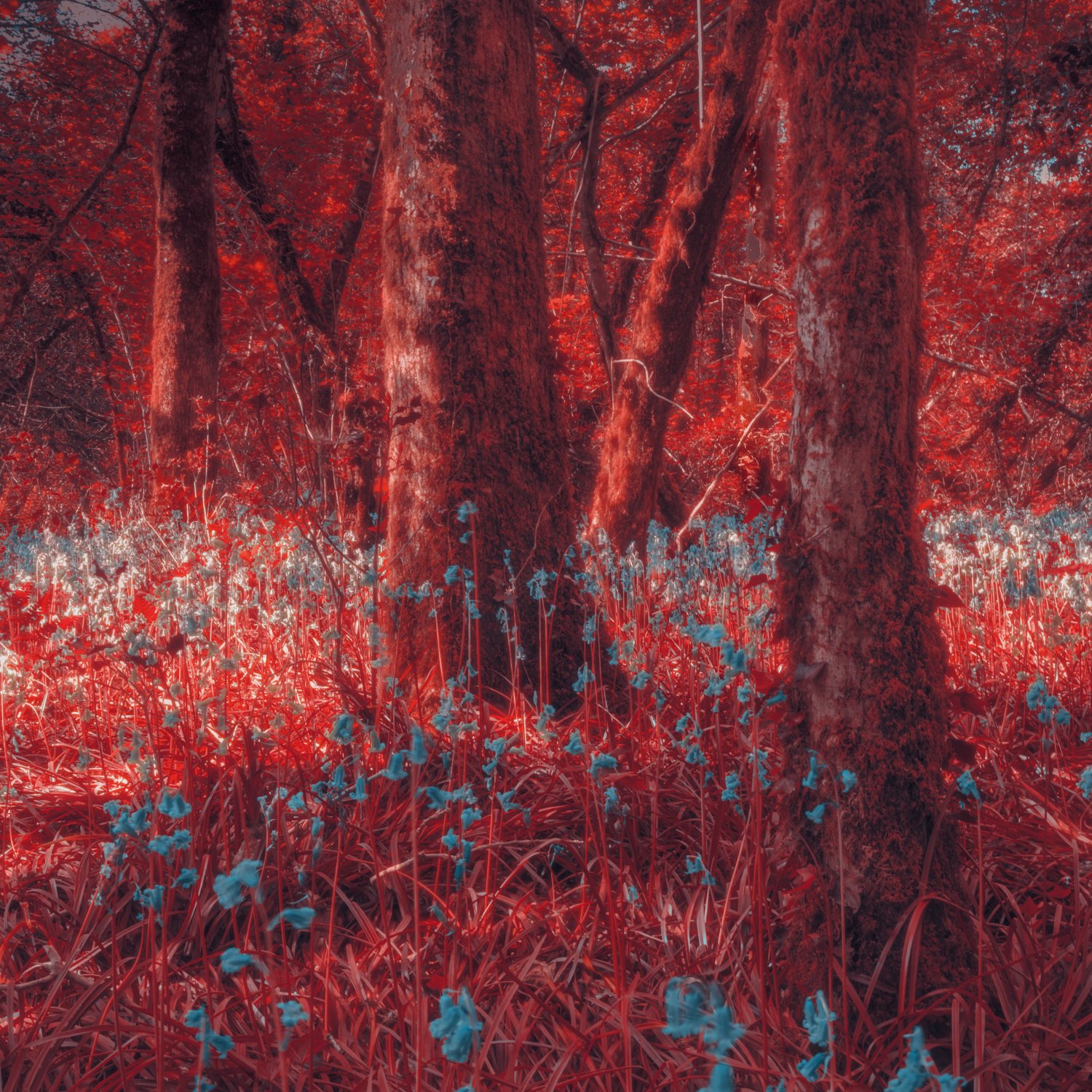
I was scrolling through Instagram one evening and stumbled across a set of images tagged #aerochrome. The colours leapt off the screen — bright pink foliage, weird cyan skies, surreal landscapes that seemed plucked from an alternate reality. I had never heard of Aerochrome before, so naturally I Googled it. What I discovered fascinated me.
It turns out that Aerochrome was a long-discontinued infrared (IR) colour film from Kodak, originally developed for totally different purposes (military and aerial reconnaissance) and re-purposed over time for art. Once I knew that, I thought, “Great – I’ll try to get that look using my existing standard digital photo and travel in Lightroom.” What followed was a humbling experiment.
I’m writing this not to say “look-at-me I made it work” but more to share what didn’t work, what did, and what lessons the attempt taught me about film emulation, workflow, subject suitability and the fact that the real thing is very much distinct. If you’ve tried “IR-film looks” in Lightroom or presets, you’ll know what I mean.
The story and science of Aerochrome
Origins and military use
Aerochrome isn’t just a cute Instagram filter name. Kodak developed the film during the 1940s for aerial reconnaissance and camouflage detection. Artistic Hive+2The Celluloid Collective+2 The idea: using near-infrared sensitivity to pick up foliage and ground differences that human vision (and ordinary film) couldn’t detect. analog.cafe+2Kodak+2
In other words: foliage that looks green to our eyes may reflect near-infrared light, and Aerochrome was tuned to pick up that. The “false-colour” effect came because the dyes and layers are arranged such that IR reflection, visible red and green reflectance all produce hues that don’t correspond to the scene as we see it. 125px.com+1
Transition to civilian / artistic use
In the 1960s and 70s Aerochrome began to be used by photographers and artists purely for the aesthetic effect of surreal colour shifts. DPReview+1 The film gained something of a cult status: pink trees, red skies, odd skin-tones, other-worldly landscapes. As one reviewer says: “Anything that reflects infrared light shows up in similar colours on this film.” Fstoppers
Discontinuation
Sadly, Aerochrome is no longer manufactured. The last formulations (for example Aerochrome III 1443) were discontinued around 2009. analog.cafe+1 Stocks exist in the second-hand market, but it’s effectively dead for new shooting purposes. Thus the only way most photographers will see Aerochrome-style imagery is via emulation.
Technical notes and caveats
-
It was an infrared sensitive false-colour reversal film: the film was designed so that the colours recorded bear no normal relationship to the actual visible colours of the light hitting the layers. 125px.com+1
-
Its spectral sensitivity extended well into the near-infrared (beyond ~750 nm) where foliage and other objects reflect differently than in the visible spectrum. analog.cafe+1
-
Because of that, the subject matter – foliage, reflective surfaces, textiles – play a huge role in how the final look appears. Indeed one guide emphasises: “Try to pre-visualise your shots and how they might look on this film.” Fstoppers
-
The fact that the film doesn’t behave like a normal visible-light film means that emulating it in a standard digital workflow (which assumes visible spectrum capture) is always going to be a compromise.
My attempt: Lightroom arms-length experiment
When I discovered these Instagram images I was immediately eager to emulate the look using one of my normal digital files. I had Lightroom set up, my usual external SSD with images ready, and figured “surely a preset or some sliders will get me close”.
The first pass
I opened a normal RAW file (one with green foliage and some blue sky) and tried to mimic the pink-foliage, cyan-sky aesthetic. I adjusted hue shifts, pushed saturation, switched greens towards magenta, blue towards cyan. I tinkered with tone curves, highlights and shadows.
But the result was… disastrous. The colours turned sickly—over-saturated blues, garish magentas, weird skin tones. The overall look felt digital and fake rather than film-dreamy. I realised that the intrinsic behaviour of Aerochrome is not just “push greens to pink” — it’s a complex interplay of IR reflectance, false-colour mapping, film base, halation, grain, highlight behaviour and processing. Lightroom alone, without knowing exactly how the film responded, was a blunt instrument.
Discovering a preset
A bit more research led me to find a preset at freepresets.io labelled “Aerochrome”. Installing that via Lightroom gave me far more interesting results: the foliage shifted to pinkish tones, skies turned teal/greenish, the overall feel was closer to what I had seen. Encouraging.
But it still didn’t feel quite right. The result still looked too “digital”. Sharp edges, no film halation, highlights that clipped harshly, a cleanliness that didn’t match what I recalled when looking at genuine Aerochrome examples.
Next step: Introducing film look via Dehancer
After the preset step I realised I needed more than just hue and saturation tweaks — I needed film character: halation, bloom, highlight roll-off, subtle grain, a sense of organic texture that comes from film. I decided to open the Lightroom-exported image (after the preset) in Dehancer, using its “Ektachrome” film profile (oddly, I chose something not labelled Aerochrome) but enabled halation and bloom effects. The logic: since Aerochrome itself doesn’t have a halation layer (I’ll explain below) I might use the halation to add a cinematic film glow that my image lacked.
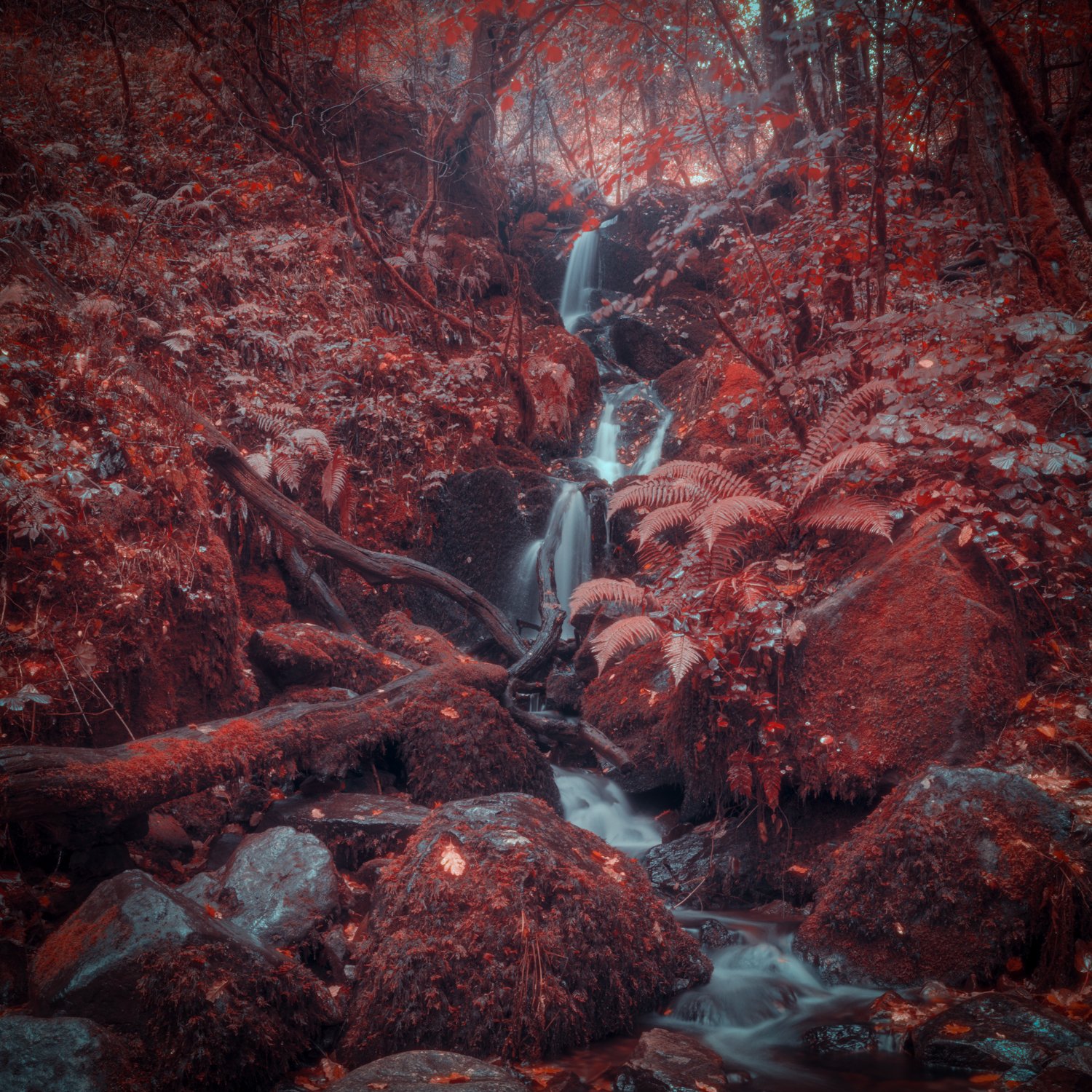
I found that this workflow produced something I liked: the highlights rolled gently, the transition from foliage-magenta to mid-tones softened, and the sky tones acquired a film-style texture rather than flat digital blues. The result is not Aerochrome—but it’s an interesting hybrid: a normal digital capture + IR-style false-colour preset + film-look film-emulation effects.
What this experiment taught me
Emulation is exactly that: emulation
I learned that a “look” like Aerochrome can to some extent be emulated, but you must accept the limitations. The real film had unique chemical and optical behaviours that a digital sensor + software can approximate, but will not replicate perfectly.
Subject matters a lot
If you feed a scene dominated by leafy greens, bright foliage and direct sunlight into the workflow, you’ll get a more convincing “Aerochrome” look (because the original film responded strongly to IR reflection from foliage). Scenes lacking those IR-rich subjects will look odd or forced. Guides emphasise that “anything that reflects infrared light shows up in similar colours on this film”. Fstoppers
In my case, the preset + Dehancer worked well for foliage+sky. For architecture or people it was less satisfying. This underlines that the emulation “probably only works for certain subjects”.
Film artifacts matter
What made the difference for me was the addition of film attributes: halation (light bleeding into highlights), bloom, grain, subtle colour shifts and highlight roll-off. Without them the look stays flat, crisp and digital-looking—and that breaks the illusion.
The real thing is a different beast
Because Aerochrome is infrared sensitive and false-colour, the best way to shoot it is using a camera modified for IR or a film camera loaded with Aerochrome and an IR filter. In other words:
-
Modified digital camera + IR filter
-
Or genuine Aerochrome film in a film camera with correct filter
digital-only emulation is widest-used, but the true look comes from IR capture.
Workflow matters
My workflow: digital RAW → Lightroom preset → export → Dehancer film profile with halation/bloom. It’s not “one click” and you must adjust based on scene, light, subject, and taste. Simply applying a preset and leaving sliders untouched will often result in that “disgustingly sickly” look I got first time.
Practical guidance for you (and me) if you want to try
Here are some tips from my experience and from research:
-
Pick the right scene: Sunlit clear day, lots of green foliage or vegetation, some sky. Shadows will help drama.
-
Meter wisely: If you were using actual Aerochrome film, exposure and filter choice matter significantly. For emulation, you still want a file captured clean, with headroom for highlights.
-
Start subtle: When shifting greens to magenta/pink, don’t over-push saturation. The film look works because the colours feel organic, not hyper-neon.
-
Add film character: Use tools like Dehancer (or similar) to add halation, bloom, film grain, perhaps subtle colour drift or even film base tint.
-
Be willing to adjust: Each scene will need tweaks. What works for a forest may not for urban architecture or portrait.
-
Know it’s an aesthetic, not an algorithm: The goal isn’t “perfect simulation” but capturing the mood. Accept where pixels, sensor behaviour and software differ from chemistry and optics.
-
If you want the real thing: Consider getting a camera modified for IR (or using a quick change IR filter) and trying to source unused Aerochrome film (rare & expensive) in a film camera. The results will be different in quality, unpredictability, and magic.

Reflecting on the look and why I did it
In my broader work (you’ll know if you’ve read my blog) I’m drawn to subtle atmosphere, to the uncanny, to merging the real world with something slightly off. The look of Aerochrome appeals to me because it takes the familiar world of trees, sky, architecture and warps it gently into something dream-adjacent. When I first saw the Instagram images I felt that slight jolting of recognition and distance — we know trees are green, sky is blue… but now they’re not. That disruption appeals to the same sensibility I have in my writing and photography: the world we know, coloured differently.
Yet, I also value authenticity: the idea of doing it digitally just because “it looks cool” felt somewhat shallow. By digging into the history of Aerochrome, understanding its original purpose (military, reconnaissance, infrared reflectance) I gained a richer appreciation for what that look is. And by trying and failing, then improving my workflow, I learned more about how film, digital, and software interact.
Final thoughts
So where does that leave me (and perhaps you)? I didn’t produce a perfect Aerochrome image. But I produced something more interesting than a mere colour shift. I created a workflow: digital capture → IR-style preset → film look processing → fine-tune for subject. I also gained a deeper respect for what film did, and what software can do in homage.
If you’re thinking of trying the look:
-
Realise you are chasing a style, not replicating a chemical process.
-
Choose your scenes carefully.
-
Add film texture.
-
Be open to tweaking, to imperfection.
-
And if you have the chance, try to shoot true IR (modified camera + filter) or even find old Aerochrome film (if you’re brave and have a film camera) — because the unpredictability, the “happy accidents”, the way foliage glows pink for real rather than via sliders, that is where the magic lies.
Finally: consider this more than just a fad. For me, the process of chasing that look has become part of the creative journey – it links digital work to analogue history, links my photography to a decade of film experimentation, and helps me push my visual work in a new direction. The aesthetic is just the door – what lies beyond is my response to it.
Thanks for reading. If you’ve tried Aerochrome emulations, tell me what your workflow was, what subjects worked best, and what you’d change next time. I’m still learning and still experimenting.
0 Comments